
Take a look at the image below. Does it look familiar? RJ45 connectors are frequently encountered in our daily lives. They help connect our computers smoothly to Ethernet networks. However, many people might not know much about them. So, what is an RJ45 connector? Let’s explore it together.
RJ45 stands for Registered Jack 45. It’s a standardized type of connector used for network and telephone connections. It is most commonly used in RJ45 connectors. You might know about RJ11 or RJ12; the “45” is the connector’s identification number, used to distinguish it from other connector types.
The RJ45 is the most commonly used Ethernet connector. It connects one network device (e.g., a personal computer) to another device (e.g., a switch or router). It’s made of clear plastic with 8 gold pins and is also often called a “modular plug” or “8P8C connector” due to its crystal-clear transparency (though “RJ45” is the common name).
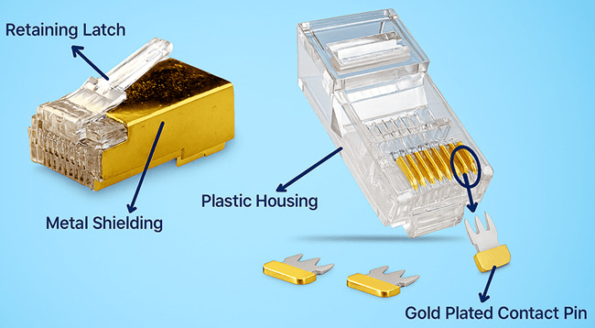
The RJ45 connector consists of several key components, as shown below:
(Note:
Original text referenced an image not provided here. Description of
components like plug body, contacts, latch, etc., would typically go
here.)
The eight pins of the RJ45 connector are typically made of gold-plated or nickel-plated copper, offering good conductivity. The plating resists oxidation, improves corrosion and wear resistance, and enhances conductivity, thereby boosting the connector’s performance and lifespan. It’s important to note that the eight pins in communication serve specific roles, as illustrated in the diagram below.
| Pin number | Pin name | Function |
|---|---|---|
| 1 | TX+ | Transmission data + |
| 2 | TX- | Transmission data – |
| 3 | RX+ | Receive data+ |
| 4 | NC | Unused |
| 5 | NC | Unused |
| 6 | RX- | Receive data- |
| 7 | NC | Unused |
| 8 | NC | Unused |
There are several standards applicable to RJ45 connectors, depending on their use. These applicable standards are briefly summarized below:
The primary functions of RJ45 connectors are as follows:
RJ45 connectors use two wiring standards: T568A and T568B. The standards differ; the cable pins are arranged in different color sequences, but use the same number of wires and the same set of colors.
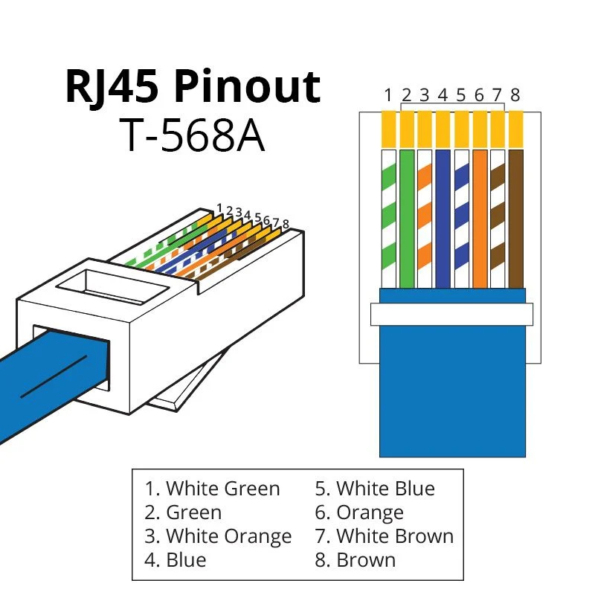
The T568A wiring standard was commonly used in the past, but T568B is now more widespread. The main advantage of the T568A wiring standard over T568B is its backward compatibility with one-pair and two-pair USOC wiring schemes.
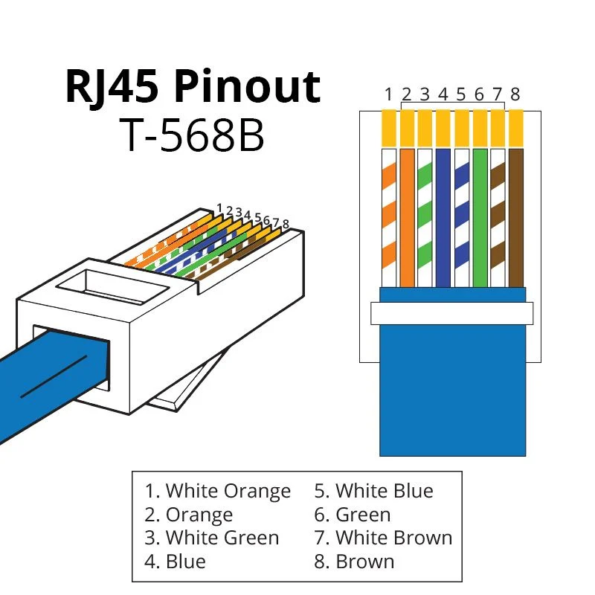
The T568B standard is the most widely used wiring standard today because it effectively isolates signals and provides better noise protection. Compared to T568A, T568B is only backward compatible with the one-pair USOC wiring scheme.
When terminating Ethernet cables, the choice of which color code standard to use for the RJ45 connector depends on the specific design needs and whether a straight-through or crossover cable is being made. Straight-through cables (patch cables) use the same wiring standard on both ends and are used to connect different types of network devices (e.g., computer to switch). Crossover cables use T568A on one end and T568B on the other to connect the same type of network device (e.g., computer to computer, switch to switch).
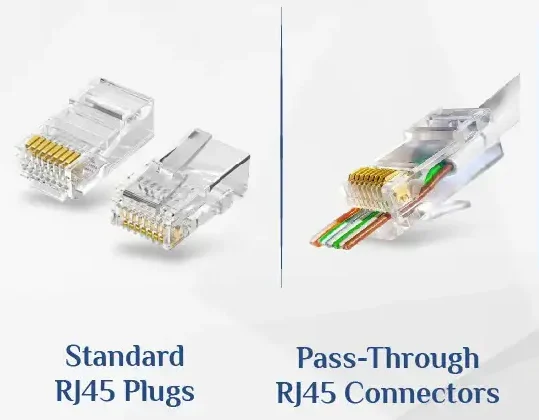
Standard connectors are non-pass-through types. Pass-through connectors allow the eight internal colored copper wires of the cable to pass through the connector, making it easier to access and align the wires when making an Ethernet cable.
When making a cable with a standard connector, the stripped and sorted wires must be cut flush to the correct length before being inserted into the standard connector. During this process, it’s easy to cut the wires too short, requiring re-stripping and sorting, or too long, needing to be pulled out and trimmed again. Pass-through connectors excel at avoiding these issues when terminating Ethernet cables.
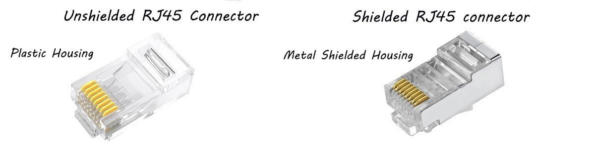
Standard RJ45 or unshielded connectors are the most common type found on most Ethernet cables. They have a plastic housing, are lightweight, easy to install, and are an economical choice for home or small office networks.
Shielded RJ45 connectors, on the other hand, typically feature a metal shield to avoid excessive Electromagnetic Interference (EMI). Nickel is a common material used for the metal shielding. These connectors are designed for environments with high levels of EMI. They help protect the data signals transmitted through the cable and ensure network performance is not compromised.
Note: Shielded RJ45 connectors are typically paired with shielded Ethernet cables for best performance. If you are using a UTP cable, choose a standard connector; if the cable is STP or similar, choose a shielded RJ45 connector.
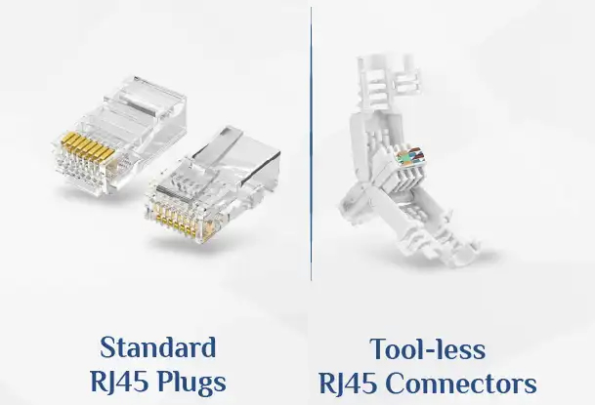
Standard RJ45 connectors require a dedicated tool, such as a crimping tool, to terminate the Ethernet cable. Tool-less RJ45 connectors do not require a crimping tool for termination. This type of tool-less RJ45 connector is also often reusable, making it very suitable for quick terminations in the field or during emergencies.
A good RJ45 connector usually looks bright, clear, and smooth, without impurities or plastic burrs. RJ45 connectors aren’t always clear and crystal-like, so don’t be surprised if you see black, gray, or blue connectors.
Furthermore, if there is a metal shield, it’s better but also more expensive. Bright gold and yellow plating are best; white or yellow nickel plating is considered good.
If you have a pack of newly purchased connectors, try shaking it and listen; the crisper the sound, the higher the density and purity of the connector material. If the sound is dull, its quality is poorer.
A good-quality locking tab can be folded over 180 degrees multiple times and return to its original shape, demonstrating good elasticity.
According to the international standard IEC 60603, RJ45 connectors should have 50μ (micron) gold-plated contact pins. The pins are gold-plated because gold is one of the best electrical conductors. The 50μ gold plating on the pin tips is designed to avoid data loss and corrosion, so you should pay attention to the gold plating thickness for better performance.
Furthermore, there are two-point and three-point contact pin designs. Three-point contact can be more stable and helps securely hold the cable wires.
When actually shopping, you can also carry a small blade. The blade serves two purposes:
One is to use the blade to scrape the metal contact area of the connector. If the copper on top is easily scraped off, and the color inside is also relatively dark; it is undoubtedly fake. Conversely, if the surface plating is difficult to scrape off, and even if a little comes off, the exposed metal contact underneath is bright, then it is a suitable connector.
The other purpose is to try to pry the metal terminals with the tip of the blade; generally, good connectors are firmly fixed and difficult to pry out, while counterfeit connectors have non-standard production processes and might come off with a gentle poke.
An RJ45 cable, or Ethernet cable, has RJ45 connectors attached to both ends. They are typically wrapped with four pairs of twisted wires, with an outer PVC jacket. Depending on the cable category, there is often a cross-shaped separator (spline) or fiber strands inside.
RJ45 cables have several categories: Cat5, Cat5e, Cat6, Cat6a, Cat7, and Cat8. Generally, the higher the category number, the greater the data transmission rate of the cable. RJ45 cables connect computers to routers, as well as computers to RJ45 ports.
First, prepare a dedicated crimping tool, then attach the RJ45 connector to the Ethernet cable. Through crimping, you ensure the RJ45 cable is unaffected during plugging and unplugging, while also protecting the cable from electrical or moisture interference. Here are the specific crimping steps:
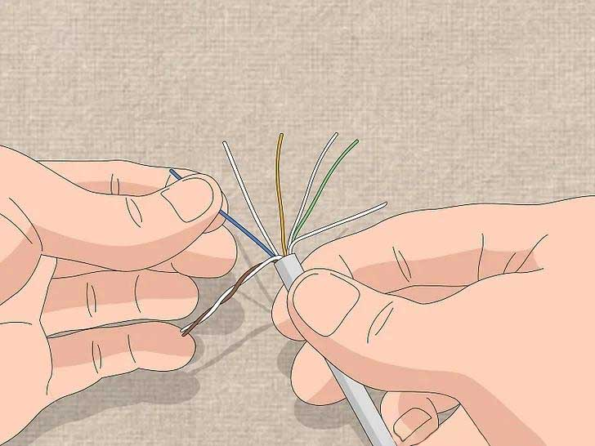
Select the desired cable category and cut the cable to the target length. Then, carefully strip off 1-2 inches of the outer plastic jacket, being careful not to damage the internal wires. Next, untwist and arrange the twisted pairs, sequencing the 8 wires according to the wiring standard (T568A or T568B). Finally, straighten and align the wires neatly, then use wire cutters to trim them to about 0.5 inches from the jacket.
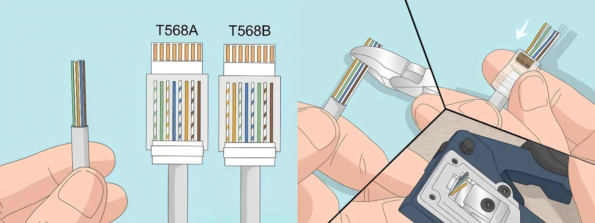
Next, insert the prepared cable into the RJ45 connector and push it all the way to the top of the connector. Then, double-check the wire order. Use the crimping tool to crimp the connector, tightening the squeeze to ensure a connection is formed.
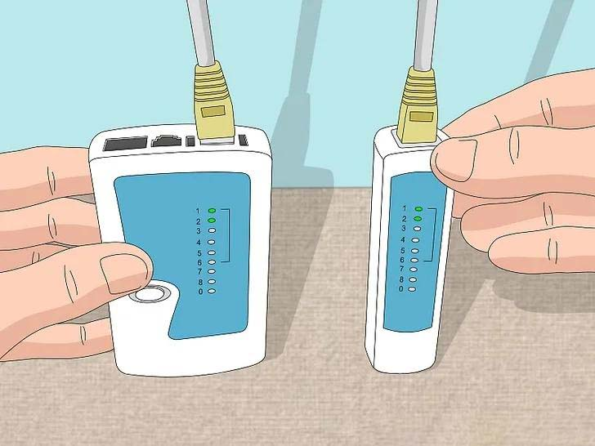
First, use a cable tester to confirm the wiring is correct. Then, connect the RJ45 cable to your computer and use the computer’s network diagnostic tools to see if the connection meets network performance requirements.
A: An RJ45 connector is the standard connector for Ethernet. It typically connects network cables to computers, routers, switches, and other network devices. The connector has 8 metal pins that plug into an RJ45 port.
A: Before crimping, you need wire strippers; for the crimping process itself, you need to buy an RJ45 crimper. A friendly suggestion is to buy a multi-function crimping tool, so you can store it properly and don’t have to spend much time picking the right tool.
A: Yes; different cable categories determine whether the cable is shielded or not. Shielded cables should use RJ45 connectors with a metal shield. Standard RJ45 connectors are plastic and may struggle to meet performance and anti-interference requirements for higher categories or noisy environments.
A: Common issues with RJ45 connectors include:
A: The RJ45 connector is on the ends of the cable, typically with a clear plastic housing and metal contacts. The RJ45 port is the interface on the device, often embedded in the device or wall, with corresponding 8 metal contacts shaped to match the connector. When the connector is inserted into the port, a “click” sound is usually heard, indicating a successful connection.
A: RJ45 connectors are primarily used for Ethernet connections, while other types of connectors (e.g., RJ11, USB, HDMI) are used for different applications. RJ11 is typically used for telephone lines, USB for data transfer and power, and HDMI for high-definition audio/video transmission. RJ45 connectors have 8 pins to support higher data transfer rates, while RJ11 typically has only 4 or 6 pins.
A: Ways to maintain RJ45 connectors include:
A: RJ45 connectors support various Ethernet standards, including:
Support for these standards typically depends on the cable category (e.g., Cat5, Cat5e, Cat6, Cat6a, Cat7, Cat8, etc.).
Making an RJ45 cable using an RJ45 connector and a crimping tool is straightforward. The finished RJ45 cable is a vital component for our access to Ethernet networks. A good RJ45 connector is crucial for the performance and lifespan of an Ethernet cable, so it must be chosen carefully. RJ45 connectors are small and compact, coming in various types and adhering to various applicable standards.

 English Home
 简体中文
简体中文 Online Message
 Skype
Skype
 QQ:20181072

